
Messaging Policy
SMS Terms & Conditions
Program Description
Imperial Valley Pool Service LLC, doing business as Imperial Valley Pool Services, offers an optional SMS messaging program to keep you informed about your pool service. Messages may include:
- Responses to your service and quote requests
- Service visit reminders and scheduling updates
- Service completion reports (chemical readings, notes)
- Invoice and payment reminders
- Important account notifications
Message frequency: Varies based on your service schedule and account activity.
Consent & Opt-In
Customers opt in by actively checking the optional SMS consent box on our Request Service, Contact, or Sign Up form. Each checkbox starts unchecked. Submitting a form or creating an account does not require SMS consent. After submitting the form, customers text JOIN from the same phone within 7 days to activate recurring texts and receive a confirmation. Owners choose password-change approval codes and optional security alerts separately in Trusted devices, then confirm from their phone. See the SMS enrollment guide. Our website is https://www.imperialvalleypoolservices.com. Messages are sent from (833) 480-8265.
By checking this box, I agree to receive recurring automated text messages (such as quote replies, appointment reminders, service updates, billing reminders, and account notifications) from Imperial Valley Pool Services at the phone number provided. Consent is not a condition of purchase. Message frequency varies with my service and account activity. Msg & data rates may apply. Reply HELP for help, STOP to cancel. After submitting this form, text JOIN to (833) 480-8265 from the number you entered within 7 days to activate SMS. See our SMS Terms and Privacy Policy.
Consent is not a condition of purchase. You can use our services without opting into SMS notifications. No mobile information will be shared with third parties/affiliates for marketing/promotional purposes. Text messaging originator opt-in data and consent will not be shared with any third parties.
Opt-Out & Help
- To stop messages: Reply STOP to any message. You will receive a one-time confirmation and no further texts.
- For help: Reply HELP or contact us at (760) 850-8473 or imperialvalleypoolservices@gmail.com.
Rates & Privacy
- Message and data rates may apply. Check with your carrier for details.
- We do not sell, rent, or share your phone number or any personal information with third parties for marketing purposes.
- Supported carriers include all major U.S. carriers. Service may not be available on all carriers.
- For full details on how we handle your data, see our Privacy Policy.
Last updated: November 16, 2026
How to enroll in texts
Our U.S. toll-free SMS number is (833) 480-8265. The instructions below apply to service and account messages and to owner security texts.
Customer service and account texts
- Open Request Service, Contact, or Sign Up and enter your mobile number.
- Choose the optional SMS checkbox. It starts unchecked and you can submit the form without it.
- After submitting this form, text JOIN to (833) 480-8265 from the number you entered within 7 days to activate SMS. A successful enrollment receives a confirmation.
By checking this box, I agree to receive recurring automated text messages (such as quote replies, appointment reminders, service updates, billing reminders, and account notifications) from Imperial Valley Pool Services at the phone number provided. Consent is not a condition of purchase. Message frequency varies with my service and account activity. Msg & data rates may apply. Reply HELP for help, STOP to cancel.
Example reminder: Imperial Valley Pool Services: Your pool service is scheduled for tomorrow. Please secure pets and leave the gate accessible. Reply STOP to opt out.
Example inquiry reply: Imperial Valley Pool Services: Thanks for your pool service inquiry. What day works for a call? Reply HELP for help or STOP to cancel.
Owner approval codes and security alerts
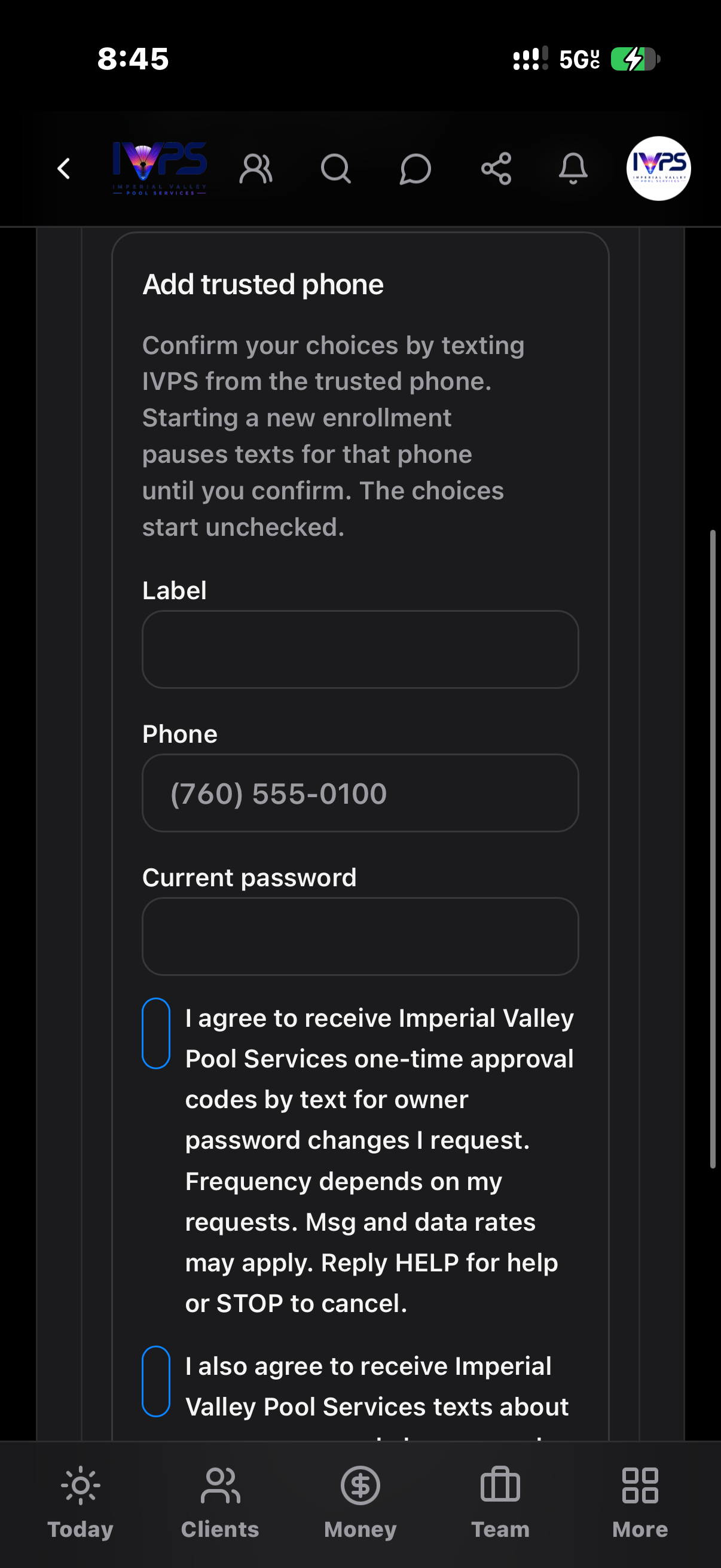
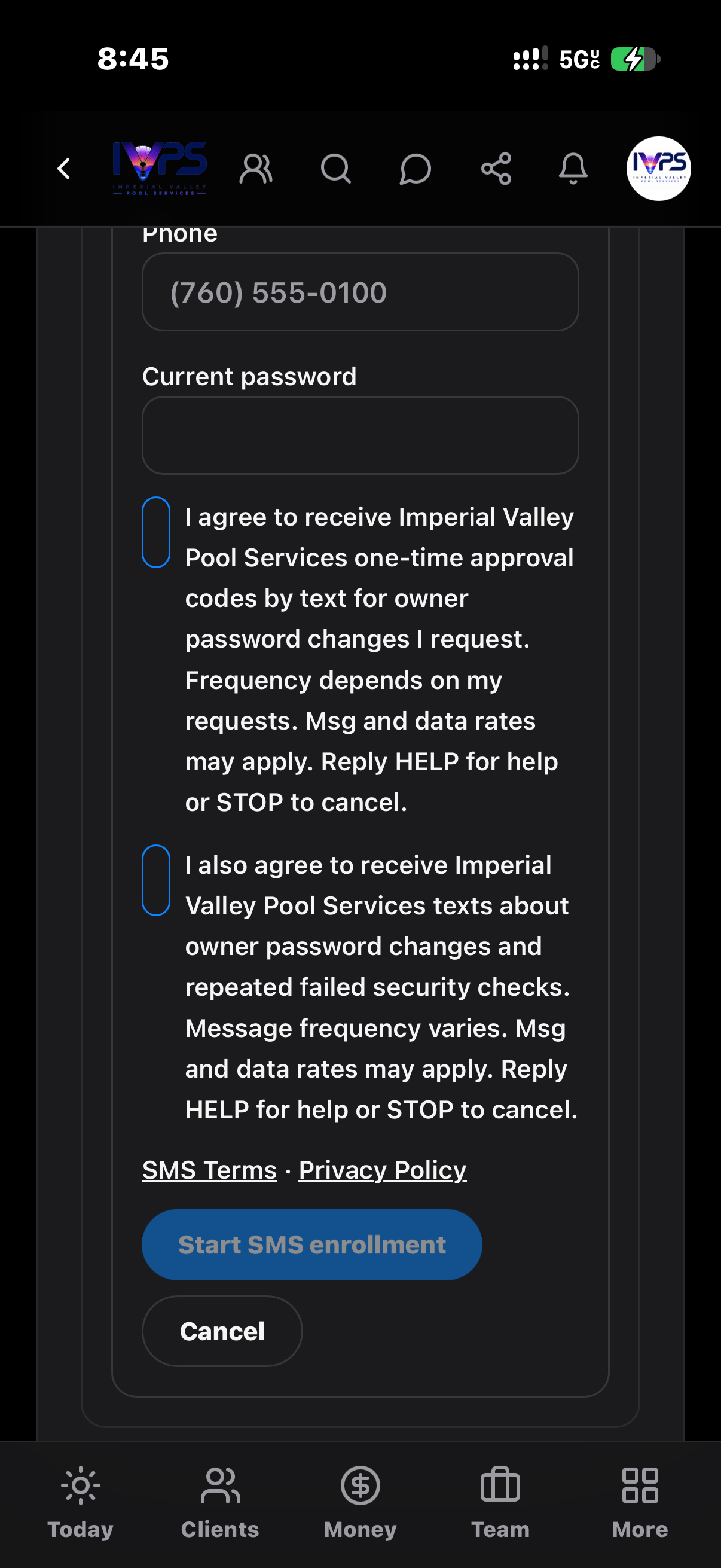
In the signed-in owner portal, open More → Settings → My account → Account Security, then find Trusted devices. Add your phone or choose SMS choices for an existing phone. Both choices start unchecked. You can leave without enrolling.
- Password-change approval codes
- I agree to receive Imperial Valley Pool Services one-time approval codes by text for owner password changes I request. Frequency depends on my requests. Msg and data rates may apply. Reply HELP for help or STOP to cancel.
- Additional security alerts
- I also agree to receive Imperial Valley Pool Services texts about owner password changes and repeated failed security checks. Message frequency varies. Msg and data rates may apply. Reply HELP for help or STOP to cancel.
After starting enrollment, use the trusted phone to text the displayed SECURITY confirmation to (833) 480-8265 within 24 hours. IVPS confirms enrollment after the text arrives from that phone. The password-change flow only sends an approval code after a request.
Example approval text: Imperial Valley Pool Services: Your owner password-change approval code is 123456. It expires in 10 minutes. Reply STOP to cancel texts.
Example security alert: Imperial Valley Pool Services: Your owner account password just changed. If this wasn’t you, contact support. Reply STOP to cancel texts.
Reply HELP for assistance or STOP to cancel. Read our Privacy Policy.